
Tutorial OpenGL v2.0
Finalmente chegou! Após quase 1 ano depois de meu primeiro artigo sobre OpenGL, chegou a versão 2.0. Clique e fique mais Geek.
[ Hits: 21.360 ]
Por: Thiago Henrique Hüpner em 08/05/2015

A jornada é longa parte 1 - Colisão Mouse e Retângulo
Esse é o maior 'medo' dos iniciantes e é o que deixa as coisas mais interessantes, mas para melhorar, saiba que não é tão complexo assim (bom , essa parte).
Essa colisão de Mouse e Retângulo também é conhecida como Colisão de um Ponto e um Retângulo. Exemplo:
#include <SDL/SDL.h>
#include <SDL/SDL_opengl.h>
#include <time.h>

#define LARGURA 400
#define ALTURA 400

int colisao(int x,int y,SDL_Rect a){
	// É verificado primeiro no eixo X
	if(x >= a.x && x <= a.x + a.w){
		// Depois no eixo Y
		if(y >= a.y && y <= a.y + a.h){
			// Se aconteceu a colisão irá retornar 1
			return 1;
		}
	}

	// Se passou pelos if's e não retornou significa que nao houve colisao
	return 0;
}

void inicializaOpenGL(){
	glClearColor(255,255,255,1);
	glMatrixMode(GL_PROJECTION);
	glLoadIdentity();
	gluOrtho2D(0,LARGURA,ALTURA,0);
	glMatrixMode(GL_MODELVIEW);
	glClear(GL_COLOR_BUFFER_BIT);
}
// Simulando o SDL_FillRect
void GL_FillRect(SDL_Rect a,int r,int g,int b){
glClear(GL_COLOR_BUFFER_BIT);
	glLoadIdentity();

	glColor3ub(r,g,b);
	glBegin(GL_QUADS);
		// Lado Superior Esquerdo
		glVertex2f(a.x,a.y);
		// Lado Superior Direito
		glVertex2f(a.x+a.w,a.y);
		// Lado Inferior Direito
		glVertex2f(a.x+a.w,a.y+a.h);
		// Lado Inferior Esquerdo
		glVertex2f(a.x,a.y+a.h);
	glEnd();
}
int main(int argc,char *argv[]){
	if(SDL_Init(SDL_INIT_VIDEO) < 0){
		printf("Erro : %s
",SDL_GetError());
		return -1;
	}

	// Para sempre ter valores pseudo-aleatorios
	srand((unsigned)time(NULL));

	SDL_GL_SetAttribute( SDL_GL_RED_SIZE, 8 );
	SDL_GL_SetAttribute( SDL_GL_GREEN_SIZE, 8 );
	SDL_GL_SetAttribute( SDL_GL_BLUE_SIZE, 8 );
	SDL_GL_SetAttribute( SDL_GL_ALPHA_SIZE, 8 );
	SDL_GL_SetAttribute( SDL_GL_DOUBLEBUFFER, 2 );

	SDL_Surface * tela = SDL_SetVideoMode(LARGURA,ALTURA,32,SDL_OPENGL);

	if(tela == NULL){
		printf("Erro : %s
",SDL_GetError());
		SDL_Quit();
		return -1;
	}

	SDL_WM_SetCaption("Colisão nem é tão complexo assim",NULL);

	SDL_Event evento;

	int estaRodando = 1;

	SDL_Rect retangulo;

inicializaOpenGL();

	int r = 255;
	int g = 0;
	int b = 0;

	int posX = 10;
	int posY = 10;

	while(estaRodando){
		while(SDL_PollEvent(&evento)){
			switch(evento.type){
				case SDL_QUIT:
					estaRodando = 0;
				break;

				case SDL_MOUSEBUTTONDOWN:
					if(evento.button.button == SDL_BUTTON_LEFT){
						// Se apertar no botão esquerdo e o mouse estiver em cima do retangulo ...
						if(colisao(evento.button.x,evento.button.y,retangulo)){
							// Muda a cor R,G e B e consequentemente a cor do retangulo muda
							// NOTA : Tem que ser 256 e não 256 , pois a chance de ser 255 é muito pequena e usando o 256 , a chance aumenta
							// de ser 255
							r = rand() % 256;
							g = rand() % 256;
							b = rand() % 256;
						}
					}else if(evento.button.button == SDL_BUTTON_RIGHT){
						// Se apertar com o botão direito , o retangulo assume a posição do mouse
						posX = evento.button.x;
						posY = evento.button.y;

					}

				break;

				default:
				break;

			}
		}

		// Propriedades do Retangulo

		// Posição X
		retangulo.x = posX;

		// Posição Y
		retangulo.y = posY;

		// Aqui a coisa começa a ficar interessante ...

		// Largura do Retangulo
		retangulo.w = 50;

		// Altura do Retangulo
		retangulo.h = 50;

		GL_FillRect(retangulo,r,g,b);

		SDL_Delay(30);

		SDL_GL_SwapBuffers();
	}
	SDL_Quit();

	return 0;

}
Compile e execute esse código:
gcc -o ColisoesAtacar ColisoesAtacar.c -lSDL -lGL -lGLU
E após clicar no retângulo com os dois botões, ficou assim para mim (poderá ser diferente):
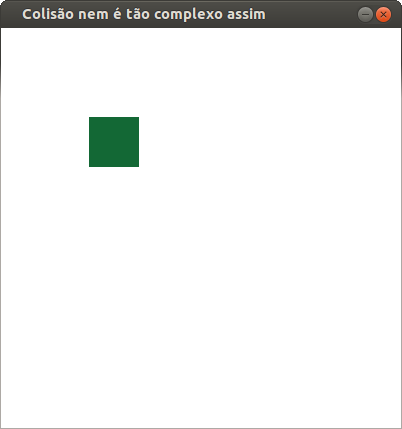
Agora vamos entender como o "if" trabalha:
Se a posição X do mouse for maior ou igual ao lado superior esquerdo do retângulo e for menor ou igual ao lado superior direito (a.x + a.w), colidiu. Agora, só nos resta detectar a colisão do eixo Y , que segue a mesma logica (até aqui).Agora um desafio: elabore um programa que tenha 3 (ou mais) retângulos e que se o usuário clicar no retângulo certo, ele muda de cor. Senão, o programa continuará sendo executado até que acerte.
Não é tão complexo assim, só é necessário pensar um pouco mais, mas nada difícil. Como existem várias formas de elaborar um mesmo programa, poderá ser diferente do meu, mas será a mesma lógica.
Eu elaborei esse programa a lá Thiago:
#include <SDL/SDL.h>
#include <SDL/SDL_opengl.h>
#include <time.h>

#define LARGURA 400
#define ALTURA 400

int colisao(int x,int y,SDL_Rect a) {
// É verificado primeiro no eixo X
    if(x >= a.x && x <= a.x + a.w) {
// Depois no eixo Y
        if(y >= a.y && y <= a.y + a.h) {
// Se aconteceu a colisão irá retornar 1
            return 1;
        }
    }

// Se passou pelos if's e não retornou significa que nao houve colisao
    return 0;
}

void inicializaOpenGL() {
    glClearColor(255,255,255,1);
    glMatrixMode(GL_PROJECTION);
    glLoadIdentity();
    gluOrtho2D(0,LARGURA,ALTURA,0);
    glMatrixMode(GL_MODELVIEW);
    glClear(GL_COLOR_BUFFER_BIT);
}

void definicoesRetangulo(int posX ,int posY,SDL_Rect * a) {

    glClear(GL_COLOR_BUFFER_BIT);

// Propriedades do Retangulo

// Posição X
    a->x = posX;

// Posição Y
    a->y = posY;

// Aqui a coisa começa a ficar interessante ...

// Largura do Retangulo
    a->w = 50;

// Altura do Retangulo
    a->h = 50;
}

// Simulando o SDL_FillRect
void GL_FillRect(SDL_Rect a,int r,int g,int b) {
    glLoadIdentity();

    glColor3ub(r,g,b);
    glBegin(GL_QUADS);
// Lado Superior Esquerdo
    glVertex2f(a.x,a.y);
// Lado Superior Direito
    glVertex2f(a.x+a.w,a.y);
// Lado Inferior Direito
    glVertex2f(a.x+a.w,a.y+a.h);
// Lado Inferior Esquerdo
    glVertex2f(a.x,a.y+a.h);
    glEnd();
}
int main(int argc,char *argv[]) {
    if(SDL_Init(SDL_INIT_VIDEO) < 0) {
// ... imprima a mensagem de erro e ...
        printf("Erro : %s
",SDL_GetError());
        return -1;
    }

// Para sempre ter valores pseudo-aleatorios
    srand((unsigned)time(NULL));

    SDL_GL_SetAttribute( SDL_GL_RED_SIZE, 8 );
    SDL_GL_SetAttribute( SDL_GL_GREEN_SIZE, 8 );
    SDL_GL_SetAttribute( SDL_GL_BLUE_SIZE, 8 );
    SDL_GL_SetAttribute( SDL_GL_ALPHA_SIZE, 8 );
    SDL_GL_SetAttribute( SDL_GL_DOUBLEBUFFER, 2 );

    SDL_Surface * tela = SDL_SetVideoMode(LARGURA,ALTURA,32,SDL_OPENGL);

    if(tela == NULL) {
        printf("Erro : %s
",SDL_GetError());
        SDL_Quit();
        return -1;
    }

    SDL_WM_SetCaption("Colisão nem é tão complexo assim",NULL);

    SDL_Event evento;

    int estaRodando = 1;

    SDL_Rect r1,r2,r3;

    inicializaOpenGL();

    int r = 255;
    int g = 0;
    int b = 0;

    while(estaRodando) {
        while(SDL_PollEvent(&evento)) {
            switch(evento.type) {
            case SDL_QUIT:
                estaRodando = 0;
                break;

            case SDL_MOUSEBUTTONDOWN:
                if(evento.button.button == SDL_BUTTON_LEFT) {
// Se apertar no botão esquerdo e o mouse estiver em cima do retangulo (2) ...
                    if(colisao(evento.button.x,evento.button.y,r2)) {
// Muda a cor R,G e B e consequentemente a cor do retangulo muda
// NOTA : Tem que ser 256 e não 256 , pois a chance de ser 255 é muito pequena e usando o 256 , a chance aumenta
// de ser 255
                        r = rand() % 256;
                        g = rand() % 256;
                        b = rand() % 256;
                    }
                }

                break;

            default:
                break;

            }
        }

        definicoesRetangulo(50,50,&r1);

        definicoesRetangulo(150,50,&r2);

        definicoesRetangulo(250,50,&r3);

        GL_FillRect(r2,r,g,b);

        GL_FillRect(r1,255,0,255);

        GL_FillRect(r3,0,255,0);

        SDL_Delay(30);

        SDL_GL_SwapBuffers();
    }
    SDL_Quit();

    return 0;

}
Salve e compile como quiser, é um desafio. Agora quem decide é você. =D
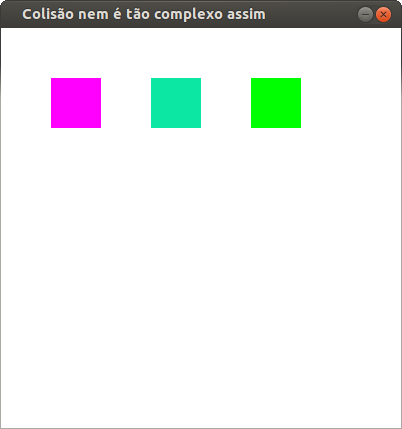
Como ficou o meu, após clicar no retângulo correto:
2. Inicializando o SDL
3. OpenGL e SDL botando pra quebrar
4. Simulando uma Gambiarra
5. A jornada é longa parte 1 - Colisão Mouse e Retângulo
6. A jornada é longa parte 2 - Colisão entre 2 Retângulos
7. "Imagine" seu programa
8. Agradecimentos, links úteis e fontes
Ubuntu/Debian/Kali Linux e outros no Android
Programando com uma granada de mão: uma visão da linguagem C
Introdução à plataforma GNU de desenvolvimento
Criando aplicativos para o Mac OS X no GNU/Linux
Túnel do Tempo: a função itoa()
Muito bom! Vou tentar criar um game simples pra minha filha ficar clicando no retângulo com a cor certa com base neste tutorial.
[1] Comentário enviado por fabio em 08/05/2015 - 10:30h
Muito bom! Vou tentar criar um game simples pra minha filha ficar clicando no retângulo com a cor certa com base neste tutorial.
Fábio, mais uma vez, muito obrigado !
E boa sorte com o aplicativo, espero que sua filha goste.
Qualquer dúvida só pedir =D
[]'s
T+
Bom artigo!
Favoritado e pega meu 10!
Até
[3] Comentário enviado por UmCaraAToa em 08/05/2015 - 11:25h
Bom artigo!
Favoritado e pega meu 10!
Até
Valeu fera
T+
Favoritado. Vou ler depois com calma. Mas só de dar uma olhada por rápida vi que é material interessante!
--
http://pastebin.com/aji5Qp05
[5] Comentário enviado por xerxeslins em 08/05/2015 - 11:49h
Favoritado. Vou ler depois com calma. Mas só de dar uma olhada por rápida vi que é material interessante!
--
http://pastebin.com/aji5Qp05
Valeu fera, Obrigado!
[]'s
T+
Parabéns pelo artigo escrito, é uns dos melhores (e únicos) artigos sobre OpenGL aqui no VOL.
[7] Comentário enviado por preroeb em 08/05/2015 - 19:02h
Parabéns pelo artigo escrito, é uns dos melhores (e únicos) artigos sobre OpenGL aqui no VOL.
Valew pela força!
Dando duro pra trazer um artigo de qualidade pra vocês, meu povinho do "Volzinho"!
[]'s
T+
Ae Parabéns brother excelente artigo , favoritado aqui tbm :)
Igor Felipe
Cadastrado desde: 25/09/2009
[b]If it moves , compile it.[/b]
[9] Comentário enviado por Felipeigor em 08/05/2015 - 19:43h
Ae Parabéns brother excelente artigo , favoritado aqui tbm :)
Igor Felipe
Cadastrado desde: 25/09/2009
[b]If it moves , compile it.[/b]
Valew Tambem pelo apoio!
[]'s
T+
Legal cara, bem explicada a parte sobre colisão. Um bom artigo como um todo. Parabéns.
[11] Comentário enviado por SamL em 09/05/2015 - 12:50h
Legal cara, bem explicada a parte sobre colisão. Um bom artigo como um todo. Parabéns.
Valew Sam! Sempre me apoiando!
[]'s
T+
Oi, Thiago!
Dei uma rápida lida no seu artigo.
Está muito bom!
Continue assim, com essas ótimas contribuições!
Ang,
Manaus, AM, Brasil.
Usuário de sistemas operacionais livres/abertos tipo Unix ou tipo DOS,
Distros Favoritas: FreeBSD, Free-DOS, , PC-DOS, Bodhi Linux, Ubuntu, Big Linux, Kurumim, OpenSUSE, Slackware e Slax.
[13] Comentário enviado por Ang em 09/05/2015 - 16:14h
Oi, Thiago!
Dei uma rápida lida no seu artigo.
Está muito bom!
Continue assim, com essas ótimas contribuições!
Ang,
Manaus, AM, Brasil.
Usuário de sistemas operacionais livres/abertos tipo Unix ou tipo DOS,
Distros Favoritas: FreeBSD, Free-DOS, , PC-DOS, Bodhi Linux, Ubuntu, Big Linux, Kurumim, OpenSUSE, Slackware e Slax.
Valew !
Obrigado por ter lido!
[]'s
T+
Patrocínio

Destaques
Artigos
A produção de áudio e vídeo no Linux e as distribuições dedicadas a esse fim
Criptografando sua Home com Gocryptfs para tristeza do meliante
A Involução do Linux e as Lambanças Desnecessárias desde o seu Lançamento
O Journal no Linux para a guarda e consulta de logs do sistema
A evolução do Linux e as mudanças que se fazem necessárias desde o seu lançamento
Dicas
Cursor do mouse gigante no KDE Plasma
Integração do Flatpak e Flathub no Kubuntu (KDE Discover)
Habilitando suporte ao Flatpak e Flathub no Ubuntu
Tópicos
Top 10 do mês
-

Xerxes
1° lugar - 154.544 pts -

Fábio Berbert de Paula
2° lugar - 79.538 pts -

Alberto Federman Neto.
3° lugar - 44.867 pts -

Buckminster
4° lugar - 44.763 pts -

Alessandro de Oliveira Faria (A.K.A. CABELO)
5° lugar - 36.748 pts -

edps
6° lugar - 33.121 pts -

Sidnei Serra
7° lugar - 25.650 pts -

Mauricio Ferrari (LinuxProativo)
8° lugar - 25.493 pts -

Daniel Lara Souza
9° lugar - 23.537 pts -

Andre (pinduvoz)
10° lugar - 22.669 pts
Scripts

A maior comunidade GNU/Linux da América Latina! Artigos, dicas, tutoriais, fórum, scripts e muito mais. Ideal para quem busca auto-ajuda.
Site hospedado por:
