
VMWare no Debian Etch (4.0)

Publicado por Junior B!u em 17/05/2007
[ Hits: 34.097 ]

VMWare no Debian Etch (4.0)
(se não baixe as imagens em: http://www.debian.org/CD/)
Sempre tive problemas em relação as dependências que o VMWare solicita. Para resolver isso basta instalar os seguintes pacotes (logado como root):
# apt-get install libx11-6 libx11-dev libxtst6 xinetd wget
# apt-get update linux-headers-`uname -r` build-essential
# apt-get install gcc binutils-doc make manpages-dev autoconf automake1.9 libtool flex bison gdb libc6-dev-amd64 lib64gcc1 gcc-2.95-d
Feito isso vamos para o WMWare!
Vamos baixar os pacotes:
VMWare Player
http://www.vmware.com/download/player/
VMWare Workstation
http://www.vmware.com/download/ws/
OBS: Aqui você vai ter que se cadastrar para fazer o download, é simples, basta fazer isso uma vez e toda vez que precisar puxar algo do site basta entrar com seu e-mail e senha.
Feito o download dos pacotes, vamos descompactar (tudo isso logado como root):
{Pode ser feito em qualquer diretório. Eu indico o /home/[usuário]}
# tar -zxvf {pacote}
# cd vmware-player-distrib/
# ./vmware-install.pl
OBS: Basta prestar atenção nas questões, mas nada que você tenha que mudar, a instalação já indica o default.
Um dos pontos que você deve ficar atento é na hora em que ele fala das conexões, você pode criar um monte de conexões sem sentido.
Nessa hora ele vai perguntar sobre Bridged, na primeira pergunta diga "yes", em seguida sobre NAT, também "yes"... a pegadinha vem em seguida, onde ele retorna a pergunta sobre Bridged, ele indica como "no", faça o que ele diz... :P
Proceda da mesma forma na instalação do VMWare Workstation.
Tudo instalado, vamos entender como funciona.
Para criar sua máquina virtual, abra o VMWare Workstation e siga as imagens. Fácil para entender.
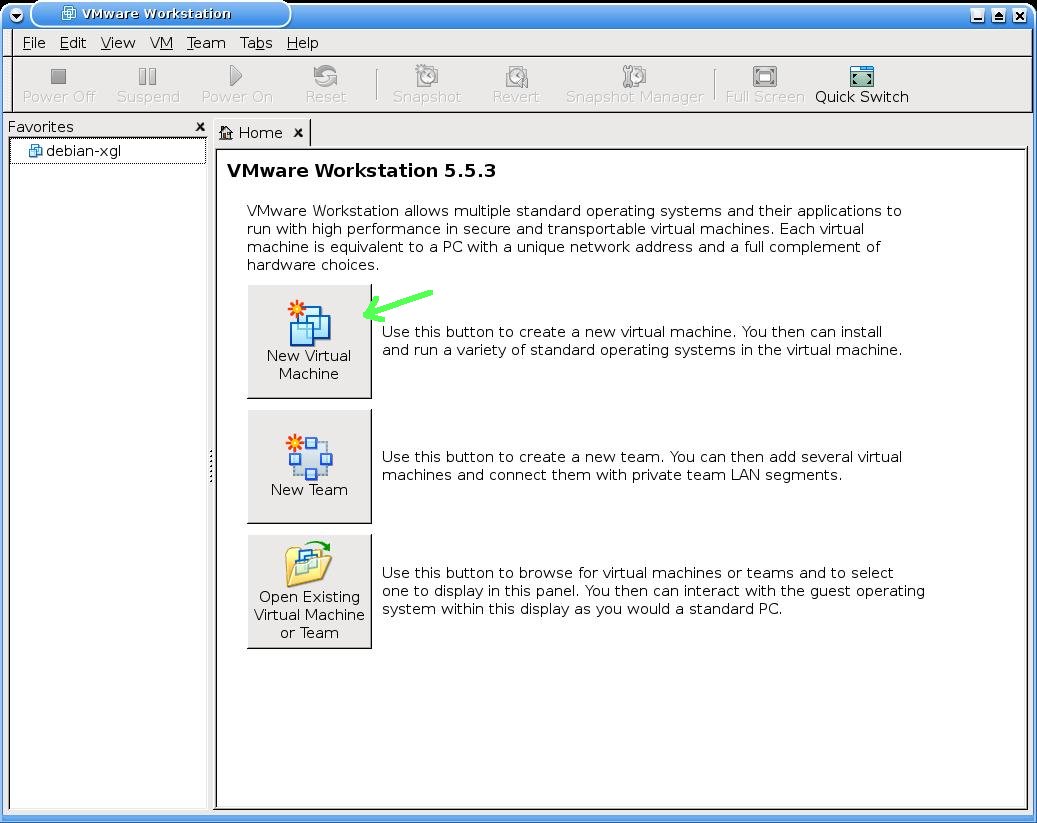
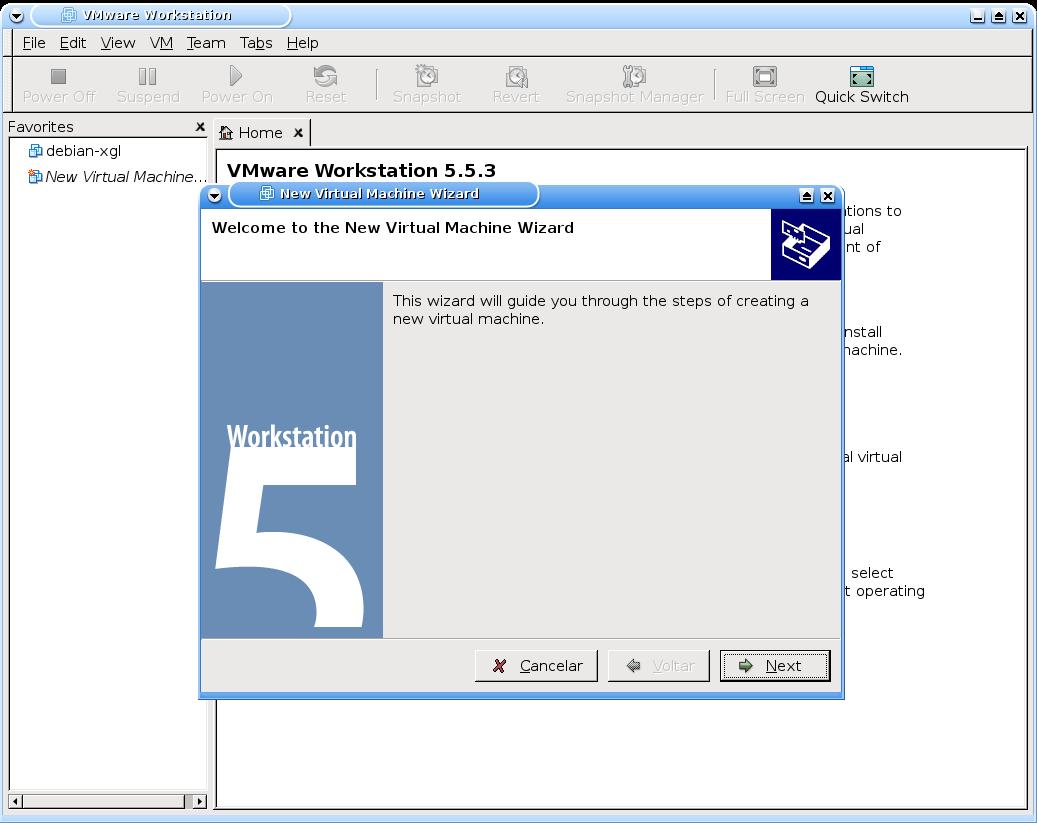
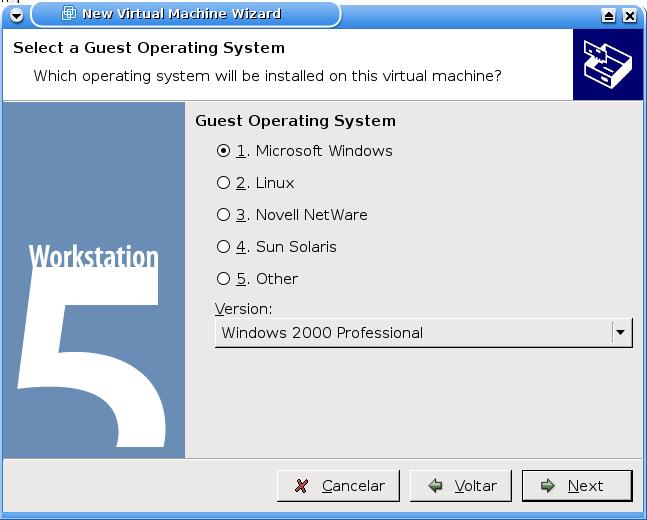
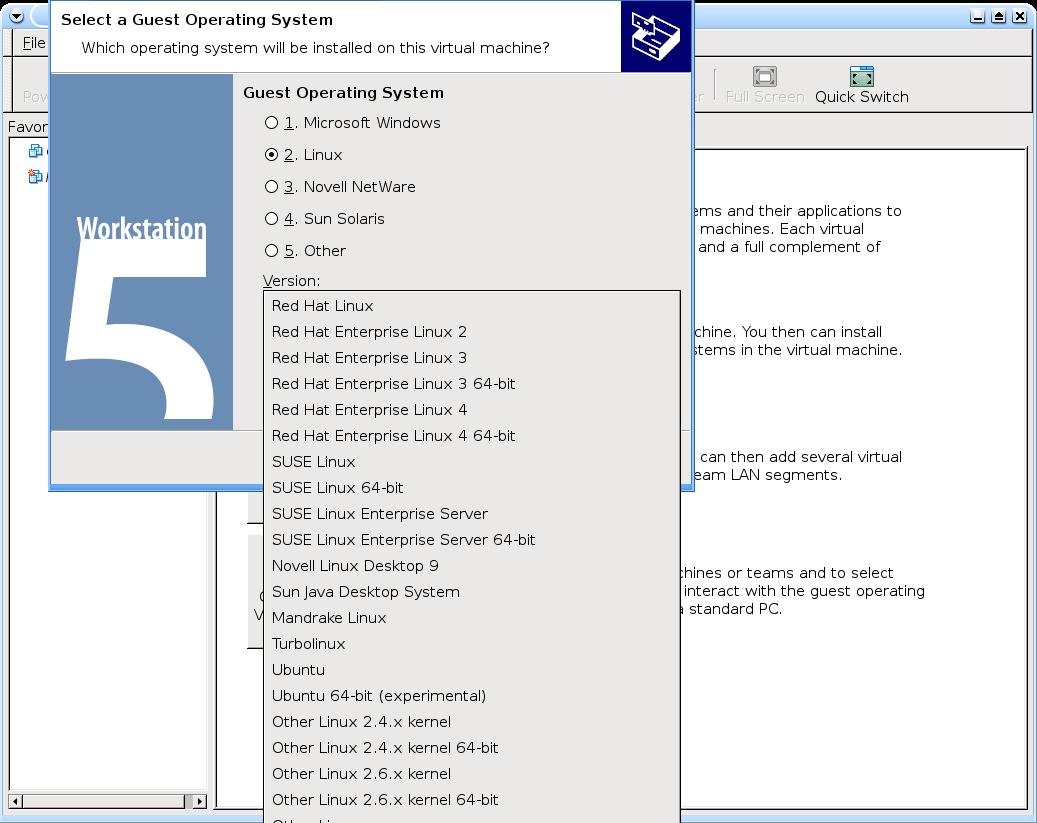
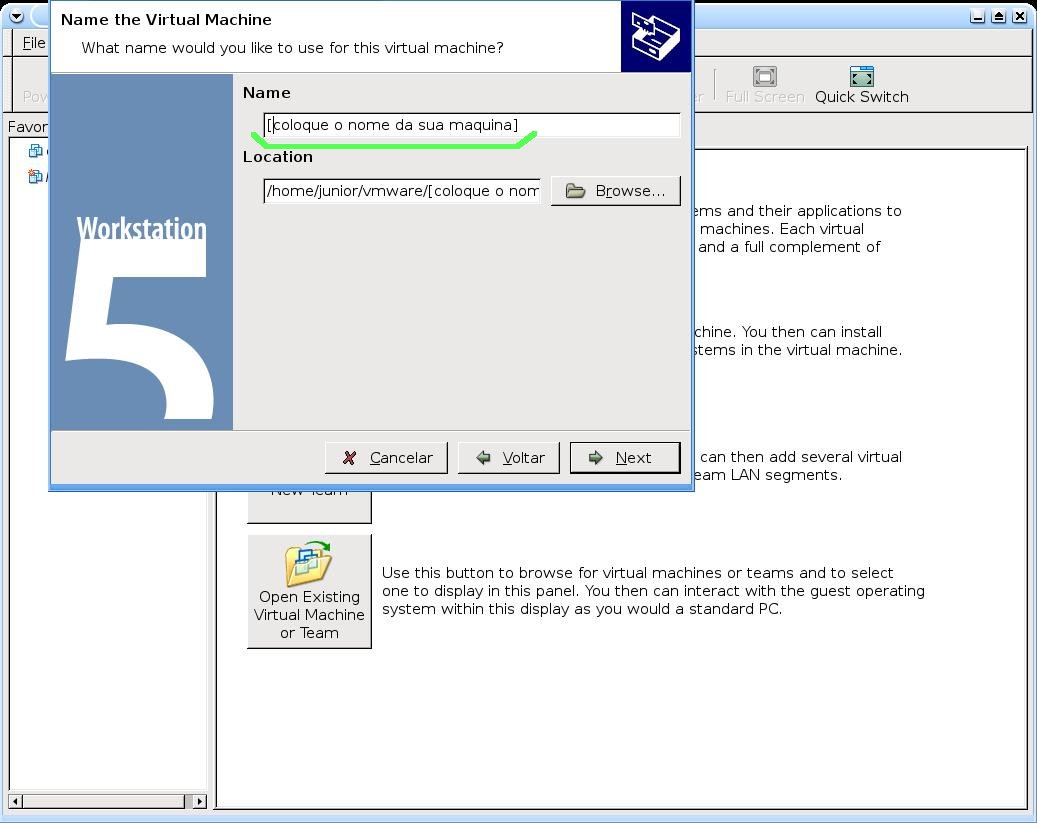
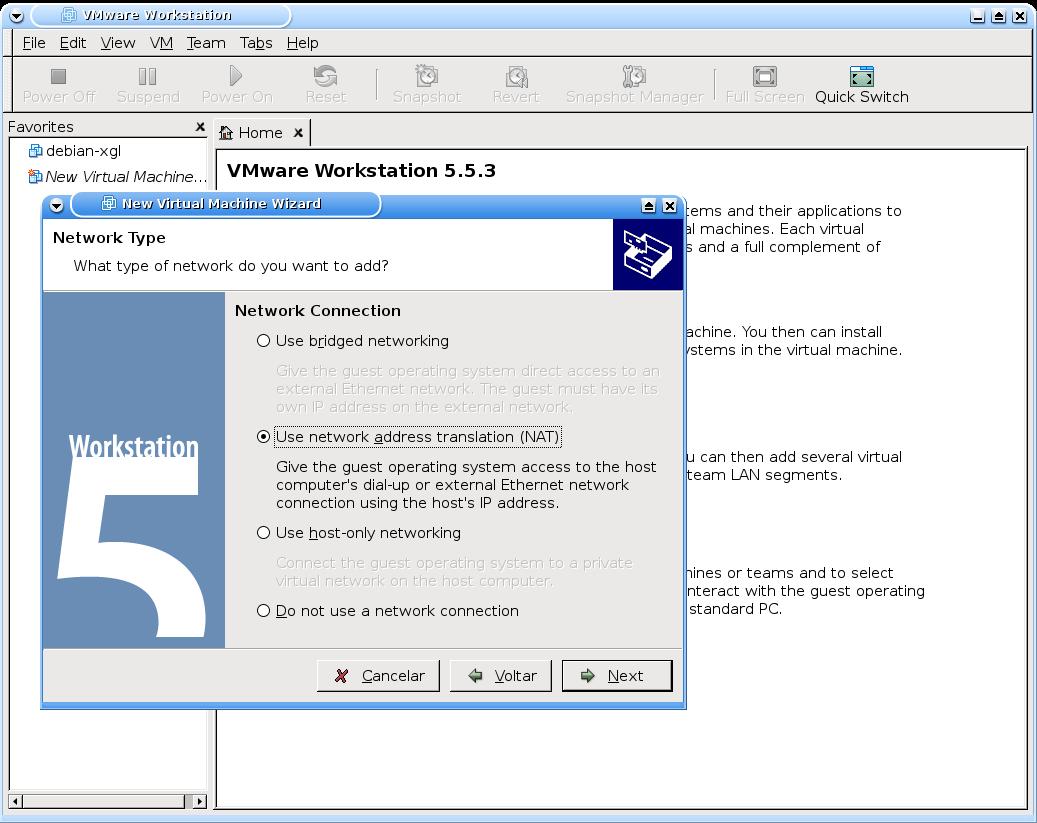
Espero ter ajudado.
Abraços
Madwifi - Wireless sem complicação
Peanut Linux - Guia de instalação
Fim da janela de notificação de dispositivos no KDE3
what(): locale::facet::_S_create_c_locale name not valid
Instalando o Compiz Fusion no Debian
Amigo estou tendo este erro tem como me ajudar
The directory of kernel headers (version @@VMWARE@@ UTS_RELEASE) does not match
your running kernel (version 2.6.18-4-amd64). Even if the module were to
compile successfully, it would not load into the running kernel.
?comentario= Cara fiz isso, funfou tudo certo.....Mas o som não funcionou, ele reclama do /dev/dsp. Mas o dsp está lá.
Opa ... Desculpem a demora ... é q ando meio corrido ...
Mas vamos lá ...
Diltinho ...
Vc tem os pacotes de copilação do kernel??
O VMWare vai trabalhar com o kernel, por isso é preciso o linux-headers, bla bla bla ....
Tente o seguinte:
# apt-get update
# apt-get install module-assistant
# m-a update
# m-a prepare
(Eu acho essa função m-a impressionante ... procure a respeito ... vc terá a mesma opnião q eu ... sr)
Ele vai baixar o que é preciso para trabalhar com o kernel.
Depois disso tenta instalar o VMWare ...
Parte para o VM6 hem !!
----------------------------------
Bmarques ...
Estranho hem ... vc deve usar o alsa ... tenta baixar o pacote e recopilar na mão ... ai acho q vai ... aqui funciona normal ...
Seu som funciona normalmente???
Qual versão do VM q vc esta??
Eu instalei o VMWare 6 ... ta lindhus .... :P
Qquer coisa dá um grito ...
Esse comando está certo?
apt-get update linux-headers-`uname -r` build-essential
Pois o resultado é
E: O comando update não leva argumentos
Opa...
Esta errado sim...
apt-get update ---> serve para atualizar a lista de pacotes disponiveis.
Não tinha nem reparado...
Correção:
# apt-get update
# apt-get install libx11-6 libx11-dev libxtst6 xinetd wget
# apt-get install linux-headers-`uname -r` build-essential
# apt-get install gcc binutils-doc make manpages-dev autoconf automake1.9 libtool flex bison gdb libc6-dev-amd64 lib64gcc1 gcc-2.95-d
# apt-get -f install
Valeu pelo toque.
Abraços
JUNIOR
Para baixar os pacotes necessarios na hora de compilar vc pode usar:
# apt-get install module-assistant
# m-a update
# m-a prepare
Pronto ... siga com a instalação.
Abraços
Velho
Obrigado por essa dica bastante objetiva.
Preciso perguntar o seguinte:
Necessito instalar vmware free e o vmware workstatiosn juntos? ou basta instalar só o freee no meu caso?
Para que serve o vmware workstation?
Opa ...
Então...
VMWare Player = vai rodar a maquina virtual, é apenas um player ...
VMWare Workstation = vai gerenciar, criar, modificar as maquinas criadas ...
Se vc tiver onde gerar as maquinas só o player resolve ...
Eu acredito que um complementa o outro ...
Seria essa a resposta a sua pergunta?
Flow
Muito boa a dica.
Outra dica para quem tiver alguns erros como eu tive:
Fazer o download deste arquivo e descompactar no diretorio da vmware
http://knihovny.cvut.cz/ftp/pub/vmware/vmware-any-...
e depois executar o comando de instalação do vmware: ./ vmware-install.pl
Abraço!
Parabéns, pelo tutorial, ajudo aki na instalação..
não consegui conclui a instalação meu pc travo, na hora, tive que reiniciar e toda vez que eu ligo o pc sempre aparece uma tela preta informando as configuraçoes do VMware no Kernel -- tipo aparece DHCP - ehterneet --- done , dai para na mesma mensagem que travou o computador na hora que eu tava isntalando no terminal .
Opa...
Vamos lá... qual a conf da sua máquina???
Vc teve algum erro durante a instalação??
Pelo que parece ele esta tentando estartar a rede da VM, o que vc pode "tentar" e subir via live-cd e retirar do boot e reconfigurar.
Veja o log.
Qquer coisa cola aqui pra gente ver e tentar ajudar a resolver... compartilhe a informação para que futuramente possamos evitar/resolver esse tipo de erro.
Abraços e aguardamos...
Flow
JR
então durante a instalação meu comutador travou geral.. tava respondendo , aquelas perguntas ... dai tava no final que ja tava aparecendo DONE, DONE, DONE
ja tava tudo concluido dai travou em uma tela DHCP, faltava so isso pra concluir dai parou tudo...
Bom tenho um notebook HP2240 , tipo ja dei boot na maquina, pq num tava abrindo dejeito nenhum o sistema operacional, eu vou tentar dinovo instalar o vmware no debian, vou quebrar a cabeça ,,, dai se trava na mesma tela ...eu colo aki di novo o que apareceu....... mas so sei que tava numa tela que estava pedindo IP da maquina, não tinha opção de colcar yes e nem no, e teve uma pergunta que foi tipo de SUB-REDE , não tinha opções deve ser por isso que falhou a conclusão da instalação..
Valeu pela força ai...vou tentar di novo...e vou aparecer aki heheh pra conta se deu certo ... XD
abraçoooo JR
Parabems pelo tutorial me ajudou muito a resolver o problema
JUNIORBIU, obrigado cara, o m-a realmente é muuuito interessante... valeu
Junior, a instalação vai bem até este momento:
None of the p-rebuilt vmmon modules for VMware Workstation is suitable for your running kernel. Do you want this program to try to build the vmmon module for your system (you need to have a C compiler installed on your system)? [yes]
Using compiler "/usr/bin/gcc". Use environment variable CC to override
What is the location of the directory of C header files tha match your running kernel? [/usr/src/linux/include]
Me desculpe a ignorância, mas o que pode estar acontecendo?
Boa tarde.
Então, isso quer dizer que o sistema não esta achando os copiladores gcc.
Eles estão instalados na maquina?
Caso não esteja tenta o module-assistant
# apt-get install module-assistant
# m-a update
# m-a prepare
Instala o build essential que ele vai indicar na instalação.
Tenta instalar em seguida.
Posta o que acontece ... ok
Abraços
Caro junorbiu, o comando abaixo contém libc6-dev-amd64 lib64gcc1, que deve de ser para quem usar processador 64 bits, como eu não uso eu não instalei, eu estou certo disso??
aguardo resposta..
junorbiu, Obs:libc6-dev-amd64 lib64gcc1, apenas estes dois eu não instalei, o resto instalei normal
# apt-get install gcc binutils-doc make manpages-dev autoconf automake1.9 libtool flex bison gdb libc6-dev-amd64 lib64gcc1 gcc-2.95-d
=D Muito bom o tuto
aqui funciono blz
Olá Pessoal !!!
Este artigo foi muito importante a iniciativa, estou instalando sem problemas. Apenas tive que instalar em modo texto, pois quando estava com instalando em gráfico, ele passava para mim um erro. Agora no modo texto esta tudo ok.
Parabéns
Jairus Lopes
DÁ A SEGUINTE MENSAGEM
What is the location of the directory of C header files that match your running
kernel? [/lib/modules/2.6.24-23-generic/build/include]
Extracting the sources of the vmmon module.
Building the vmmon module.
Using 2.6.x kernel build system.
make: Entrando no diretório `/tmp/vmware-config3/vmmon-only'
make -C /lib/modules/2.6.24-23-generic/build/include/.. SUBDIRS=$PWD SRCROOT=$PWD/. modules
make[1]: Entrando no diretório `/usr/src/linux-headers-2.6.24-23-generic'
CC [M] /tmp/vmware-config3/vmmon-only/linux/driver.o
In file included from /tmp/vmware-config3/vmmon-only/./include/vmware.h:25,
from /tmp/vmware-config3/vmmon-only/linux/driver.c:48:
/tmp/vmware-config3/vmmon-only/./include/vm_basic_types.h:161: erro: conflicting types for ‘uintptr_t’
include/linux/types.h:40: erro: previous declaration of ‘uintptr_t’ was here
No arquivo incluído de /tmp/vmware-config3/vmmon-only/linux/driver.h:20,
de /tmp/vmware-config3/vmmon-only/linux/driver.c:49:
/tmp/vmware-config3/vmmon-only/./include/compat_wait.h:37:5: aviso: "VMW_HAVE_EPOLL" não éstá definido
/tmp/vmware-config3/vmmon-only/./include/compat_wait.h:43:5: aviso: "VMW_HAVE_EPOLL" não éstá definido
In file included from /tmp/vmware-config3/vmmon-only/linux/driver.h:20,
from /tmp/vmware-config3/vmmon-only/linux/driver.c:49:
/tmp/vmware-config3/vmmon-only/./include/compat_wait.h:60: erro: conflicting types for ‘poll_initwait’
include/linux/poll.h:65: erro: previous declaration of ‘poll_initwait’ was here
/tmp/vmware-config3/vmmon-only/linux/driver.c:147: aviso: initialization from incompatible pointer type
/tmp/vmware-config3/vmmon-only/linux/driver.c:151: aviso: initialization from incompatible pointer type
/tmp/vmware-config3/vmmon-only/linux/driver.c: Na função ‘LinuxDriver_Ioctl’:
/tmp/vmware-config3/vmmon-only/linux/driver.c:1659: erro: ‘struct mm_struct’ has no member named ‘dumpable’
make[2]: ** [/tmp/vmware-config3/vmmon-only/linux/driver.o] Erro 1
make[1]: ** [_module_/tmp/vmware-config3/vmmon-only] Erro 2
make[1]: Saindo do diretório `/usr/src/linux-headers-2.6.24-23-generic'
make: ** [vmmon.ko] Erro 2
make: Saindo do diretório `/tmp/vmware-config3/vmmon-only'
Unable to build the vmmon module.
For more information on how to troubleshoot module-related problems, please
visit our Web site at "http://www.vmware.com/download/modules/modules.html" and
"http://www.vmware.com/support/reference/linux/prebuilt_modules_linux.html".
Execution aborted.
root@cordovil-desktop:/home/angelo/Aplicativos/vmware-server-distrib#
QUAL SERIA A SOLUÇÃO???
Editar
fiz o seguinte eu instalei a versao mais nova do vmware agora da a seguinte mensagem
/usr/lib/vmware/bin/vmware: /usr/lib/vmware/lib/libgcc_s.so.1/libgcc_s.so.1: version `GCC_3.4' not found (required by /usr/lib/libcairo.so.2)
/usr/lib/vmware/bin/vmware: /usr/lib/vmware/lib/libgcc_s.so.1/libgcc_s.so.1: version `GCC_4.2.0' not found (required by /usr/lib/libstdc++.so.6)
/usr/lib/vmware/bin/vmware: /usr/lib/vmware/lib/libgcc_s.so.1/libgcc_s.so.1: version `GCC_3.4' not found (required by /usr/lib/libcairo.so.2)
/usr/lib/vmware/bin/vmware: /usr/lib/vmware/lib/libgcc_s.so.1/libgcc_s.so.1: version `GCC_4.2.0' not found (required by /usr/lib/libstdc++.so.6)
/usr/lib/vmware/bin/vmware: /usr/lib/vmware/lib/libgcc_s.so.1/libgcc_s.so.1: version `GCC_3.4' not found (required by /usr/lib/libcairo.so.2)
/usr/lib/vmware/bin/vmware: /usr/lib/vmware/lib/libgcc_s.so.1/libgcc_s.so.1: version `GCC_4.2.0' not found (required by /usr/lib/libstdc++.so.6)
porem ao tentar instalar estas versoes, o sistema informa que ja é a versao mais nova
usei tambem
http://knihovny.cvut.cz/ftp/pub/vmware/vmware-any-any-update115.tar.gz
e deu o seguinte
# ./runme.pl
Updating /usr/bin/vmware-config.pl ... already patched
Updating /usr/bin/vmware ... No patch needed/available
Updating /usr/bin/vmnet-bridge ... No patch needed/available
Updating /usr/lib/vmware/bin/vmware-vmx ... No patch needed/available
Updating /usr/lib/vmware/bin-debug/vmware-vmx ... No patch needed/available
VMware modules in "/usr/lib/vmware/modules/source" has been updated.
Before running VMware for the first time after update, you need to configure it
for your running kernel by invoking the following command:
"/usr/bin/vmware-config.pl". Do you want this script to invoke the command for
you now? [yes]
Making sure services for VMware Server are stopped.
Stopping VMware services:
Virtual machine monitor done
Bridged networking on /dev/vmnet0 done
DHCP server on /dev/vmnet1 done
Host-only networking on /dev/vmnet1 done
DHCP server on /dev/vmnet8 done
NAT service on /dev/vmnet8 done
Host-only networking on /dev/vmnet8 done
Virtual ethernet done
Configuring fallback GTK+ 2.4 libraries.
In which directory do you want to install the mime type icons?
[/usr/share/icons]
What directory contains your desktop menu entry files? These files have a
.desktop file extension. [/usr/share/applications]
In which directory do you want to install the application's icon?
[/usr/share/pixmaps]
/usr/share/applications/vmware-server.desktop: warning: value "vmware-server.png" for key "Icon" in group "Desktop Entry" is an icon name with an extension, but there should be no extension as described in the Icon Theme Specification if the value is not an absolute path
/usr/share/applications/vmware-console-uri-handler.desktop: warning: value "vmware-server.png" for key "Icon" in group "Desktop Entry" is an icon name with an extension, but there should be no extension as described in the Icon Theme Specification if the value is not an absolute path
Trying to find a suitable vmmon module for your running kernel.
None of the pre-built vmmon modules for VMware Server is suitable for your
running kernel. Do you want this program to try to build the vmmon module for
your system (you need to have a C compiler installed on your system)? [yes]
Using compiler "/usr/bin/gcc". Use environment variable CC to override.
What is the location of the directory of C header files that match your running
kernel? [/lib/modules/2.6.24-23-generic/build/include]
Extracting the sources of the vmmon module.
Building the vmmon module.
Building for VMware Server 1.0.0.
Using 2.6.x kernel build system.
make: Entrando no diretório `/tmp/vmware-config0/vmmon-only'
make -C /lib/modules/2.6.24-23-generic/build/include/.. SUBDIRS=$PWD SRCROOT=$PWD/. modules
make[1]: Entrando no diretório `/usr/src/linux-headers-2.6.24-23-generic'
CC [M] /tmp/vmware-config0/vmmon-only/linux/driver.o
CC [M] /tmp/vmware-config0/vmmon-only/linux/driverLog.o
CC [M] /tmp/vmware-config0/vmmon-only/linux/hostif.o
CC [M] /tmp/vmware-config0/vmmon-only/common/comport.o
CC [M] /tmp/vmware-config0/vmmon-only/common/cpuid.o
No arquivo incluído de include/asm/bitops.h:2,
de /tmp/vmware-config0/vmmon-only/./include/vcpuset.h:74,
de /tmp/vmware-config0/vmmon-only/./include/modulecall.h:23,
de /tmp/vmware-config0/vmmon-only/common/vmx86.h:19,
de /tmp/vmware-config0/vmmon-only/common/hostif.h:18,
de /tmp/vmware-config0/vmmon-only/common/cpuid.c:15:
include/asm/bitops_32.h:9:2: erro: #error only <linux/bitops.h> can be included directly
make[2]: ** [/tmp/vmware-config0/vmmon-only/common/cpuid.o] Erro 1
make[1]: ** [_module_/tmp/vmware-config0/vmmon-only] Erro 2
make[1]: Saindo do diretório `/usr/src/linux-headers-2.6.24-23-generic'
make: ** [vmmon.ko] Erro 2
make: Saindo do diretório `/tmp/vmware-config0/vmmon-only'
Unable to build the vmmon module.
For more information on how to troubleshoot module-related problems, please
visit our Web site at "http://www.vmware.com/download/modules/modules.html" and
"http://www.vmware.com/support/reference/linux/prebuilt_modules_linux.html".
Execution aborted.
root@cordovil-desktop:/home/angelo/Área de Trabalho/vmware-any-any-update115#
???????????????????????????????????????????????????????????????????????????
o que fazer??
Patrocínio

Destaques
Artigos
Melhorando o tempo de boot do Fedora e outras distribuições
Como instalar as extensões Dash To Dock e Hide Top Bar no Gnome 45/46
E a guerra contra bots continua
Tradução do artigo do filósofo Gottfried Wilhelm Leibniz sobre o sistema binário
Conheça o firewall OpenGFW, uma implementação do (Great Firewall of China).
Dicas
Instalando o FreeOffice no LMDE 6
Anki: Remover Tags de Estilo HTML de Todas as Cartas
Colocando uma opção de redimensionamento de imagem no menu de contexto do KDE
Tópicos
Debian Bookworm para a versão beta Debian 13 Trixie (3)
Não consigo acessar os modos de desempenho (5)
Alguém pode me ajudar porfavor como executar comandos ao iniciar no i3... (2)
Top 10 do mês
-

Xerxes
1° lugar - 70.271 pts -

Fábio Berbert de Paula
2° lugar - 57.129 pts -

Clodoaldo Santos
3° lugar - 42.884 pts -

Buckminster
4° lugar - 23.689 pts -

Sidnei Serra
5° lugar - 23.305 pts -

Daniel Lara Souza
6° lugar - 17.414 pts -

Mauricio Ferrari
7° lugar - 17.098 pts -

Alberto Federman Neto.
8° lugar - 17.049 pts -

Diego Mendes Rodrigues
9° lugar - 15.668 pts -

edps
10° lugar - 14.331 pts
Scripts
[Shell Script] Script para desinstalar pacotes desnecessários no OpenSuse
[Shell Script] Script para criar certificados de forma automatizada no OpenVpn
[Shell Script] Conversor de vídeo com opção de legenda
[C/C++] BRT - Bulk Renaming Tool
[Shell Script] Criação de Usuarios , Grupo e instalação do servidor de arquivos samba

A maior comunidade GNU/Linux da América Latina! Artigos, dicas, tutoriais, fórum, scripts e muito mais. Ideal para quem busca auto-ajuda.
Site hospedado por:
